Core Concepts
Campaigns#
There's no separate "fundraising campaign" object. Every ask — a single donation page, a ticketed event — starts from the standard Salesforce Campaign.
Campaign is the anchor#
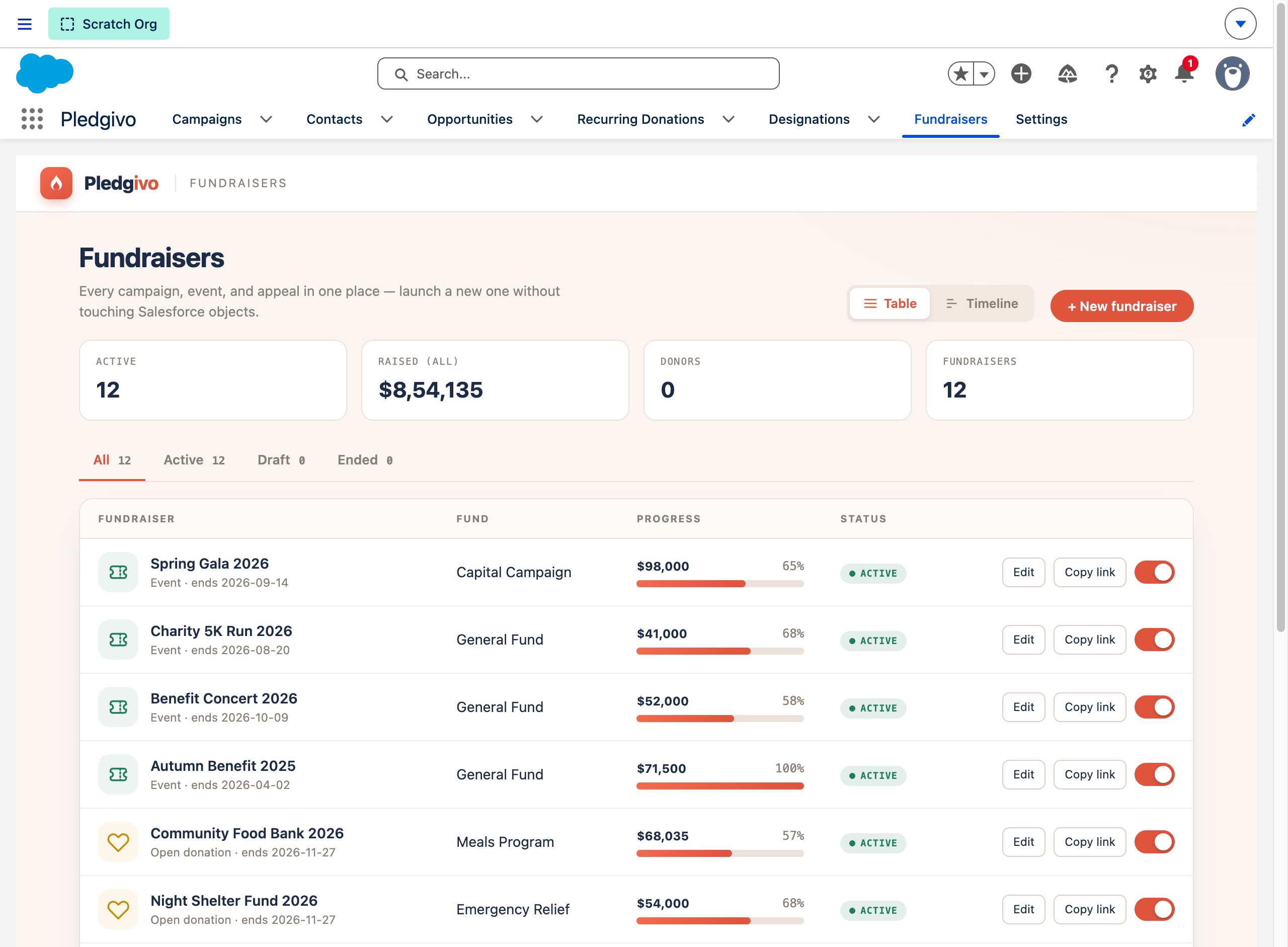
**What it shows.** The Fundraisers console — every Campaign the package touches (donation appeals, ticketed events) in one table with fund, progress toward goal, and status, backed entirely by standard Campaign records rather than a parallel object.
Using the standard Campaign object means campaign reporting, campaign member tracking, and campaign hierarchies all work the way they already do in your org — Pledgivo adds fields and related objects on top rather than introducing a parallel structure.
A Campaign gains, through the package:
| Related object | Purpose |
|---|---|
Payment_Account__c |
Which connected Stripe account this campaign's donations settle to (a lookup on the Campaign — one account per campaign) |
Campaign_Design__c |
The page design/theme applied to this campaign's public donation page |
Designation__c |
Optional fund designations a donor can choose (e.g. "Where needed most," "Youth programs") |
Custom_Question__c |
Optional extra questions shown on the donation form |
Campaign_FAQ__c |
FAQ content shown on the public campaign page |
Three kinds of fundraiser#
Every campaign the package touches is one of exactly three kinds, held in Campaign_Subtype__c.
The kind is what decides which public page a donor lands on, which badge the campaign directory
gives it, and whether the page shows a progress bar or a ticket picker.
| Kind | What it is | What a donor sees |
|---|---|---|
| Crowdfunding | An appeal raising toward a target, usually with a deadline | A raised-of-goal progress bar and a percentage |
| Ongoing | An evergreen fund with no target and no end date | The amount raised and the number of donors — no bar, no percentage |
| Event | A dated event selling tickets rather than collecting gifts | A ticket tier picker with a quantity stepper |
These three words are the only names these kinds have. They are the labels on the picklist, the buttons in the create wizard, the badge on a directory card and the pill on the fundraiser record — so what you pick when you create a fundraiser is what you read back everywhere afterwards.
Crowdfunding and Ongoing are the same page; the goal is the difference. They share one layout, one form and one donation pipeline. What separates them is whether the campaign carries a Goal Amount: with a goal there is a bar to draw, and without one there is not. That is why the create wizard hides the goal and the end date entirely once you choose Ongoing — an ongoing fund that quietly kept a goal would render as a crowdfunding page under an Ongoing badge, which is exactly the confusion the two questions exist to prevent.
An Ongoing fundraiser cannot hold a goal at all. This is enforced on the record, not just in the wizard: saving an Ongoing campaign with a Goal Amount is rejected with an error asking you to clear the goal or switch the type to Crowdfunding. That applies wherever the save comes from — the wizard, the standard Campaign page, an import, a Flow or the API — so the contradiction cannot be introduced by going around the wizard. A goal of zero is treated as no goal and saves normally.
There is one deliberate carve-out, for records that already carried both before the rule existed: editing an unrelated field on such a campaign still saves, so a legacy row is not made permanently un-editable (and does not block the nightly rollup batch for every other campaign in its chunk). Touching either half of the contradiction — the fundraiser type or the Goal Amount — asks you to resolve it, so the record stops being legacy the moment anyone edits the part that matters.
If you change your mind later and switch an existing fundraiser to Ongoing, the wizard does not throw away a goal or end date you already set. It shows a notice saying the values are still there and offers to clear them in one click, so nothing is lost without your say-so. Clearing the goal is required before the switch will save; the end date is yours to keep or clear, and while it is set the console still tags the fundraiser Completed once the date passes.
The record type is not the type
All three share the single packaged Fundraising record type. It exists as a packaging
boundary, not as a distinction a donor can see — Campaign_Subtype__c is the field that
actually changes anything.
When a campaign stops taking money#
Two separate switches decide this, and they do different jobs.
Status decides whether the page exists at all. A Campaign that isn't Active is invisible to
the public — its URL returns nothing, whatever its dates say. That is the switch to use when an
appeal should disappear.
End date is, by default, presentation only. It drives the countdown on the page and the "Ended" tag in the Fundraisers console, but an Active campaign goes on accepting gifts after it passes. That is deliberate and usually right: for most appeals the date is a milestone — a gala night, a match deadline, a season — and a donor who arrives a week late with a gift in hand should not be turned away.
When the date is a genuine deadline, turn off Keep accepting after the end date on the campaign. From the day after the end date, the public page then shows a short closing message in place of the form, and the server refuses any gift or ticket order for that campaign even if someone reaches the endpoint directly.
Nothing changes on existing campaigns
The toggle is on for every campaign, existing and new. Upgrading the package does not close anything — an ended campaign keeps behaving exactly as it did until someone deliberately turns the toggle off on that campaign.
Two things are unaffected either way. Recurring gifts already in place keep renewing — an ended campaign does not cancel a donor's monthly schedule, which is governed by the campaign's recurring behaviour and migration settings instead. And a ticketed event stops selling seats the day after the event regardless, since a seat at a night that already happened isn't sellable whatever the toggle says.
Offering to let donors cover the fee#
Let donors cover processing fees is a per-campaign toggle, off unless you turn it on. When it's on, the campaign's form offers the donor a checkbox to add your processor's cut on top of their gift; when it's off, no request can apply coverage to that campaign whatever it claims. Keeping the decision on the campaign means a delicate appeal can leave it alone while a year-end push turns it on. The rate itself is org-wide — see Donations & payments.
Watch the Page Designs panel#
The Page Designs panel: six packaged designs, one of them the org default. Packaged designs are read-only — changing one means cloning it first, which the clip shows.
Page design and the Page Canvas#
A campaign's public donation page is composed, not hard-coded. Campaign_Design__c holds a
Form_Builder_JSON__c document describing a three-step wizard:
- Compose — a movable, interleavable sequence of field blocks (amount, frequency, donor info, custom questions, designation, tribute/dedication, employer match) and content blocks (rich text, image, video, testimonial, gallery).
- Payment — locked. Always the Stripe Payment Element step, positioned by the framework, not the admin.
- Thank You — the locked confirmation block plus optional share/call-to-action blocks.
Note that the donor's actual confirmation is now a separate page at
/thank-you, and this step's custom copy does not yet reach it — see Donations & payments.
Admins build this in Settings → Experience Cloud → Designs, using the Page Canvas composer — drag blocks into Step 1, leave Step 2 alone, customize Step 3.
Content blocks render beside the story, not inside the form. Since the two-column page landed, the rich text, images, video, testimonials and galleries you arrange in Step 1 render in the wide column under the story — in the order you arranged them — rather than interleaved between the donation form's fields. Interleaving was only ever a workaround for a page the form owned end to end; a testimonial belongs beside the story, not between the amount and the Donate button.
FAQs are deliberately not a block. Any FAQ selected on the campaign becomes a tab in the page's tabbed well, alongside Documents and Updates. That placement is fixed on every design, so an FAQ can never be dropped between the last field and the Donate button, and a campaign that has selected FAQs can never end up not showing them. A campaign with no FAQs simply has no FAQ tab.
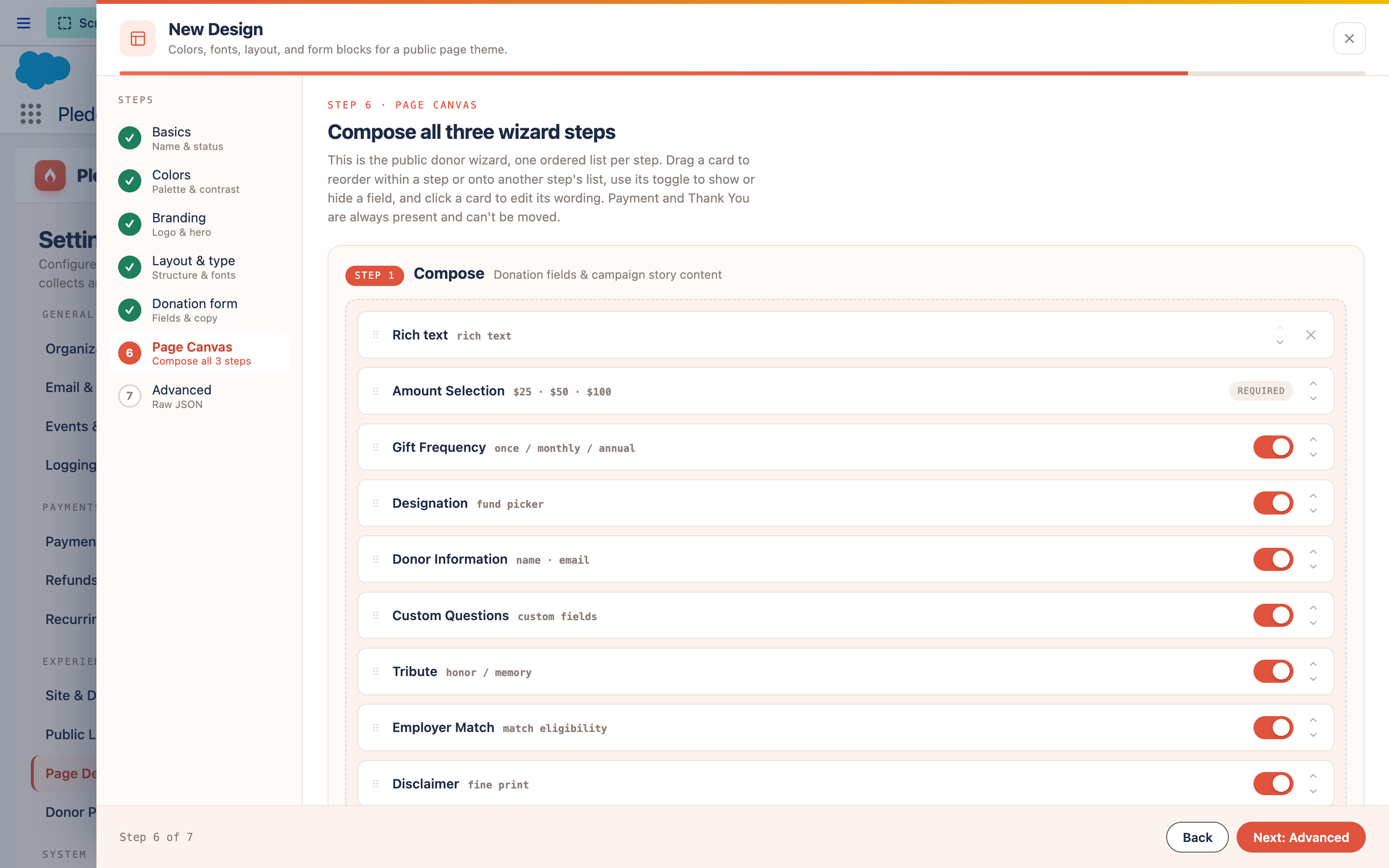
**What it shows.** The Page Canvas editor showing a sequence of field and content blocks in the Compose step, with a drag handle on each.
Layout modes#
Retired. The six layout modes (Spotlight, Split_Hero, Summary_Sidebar, Conversational,
Immersive, Momentum) and the separate Event_Layout__c were removed on 13 August 2026. Every
public page is now the two-column page below, and the only structural choice is the column ratio.
See The column ratio for what replaced them and why.
Theming#
Visual styling — colors, fonts, radius, spacing — is controlled by a token system rather than
free-form CSS. Every override a campaign design can make is one of a fixed, packaged catalog of
tokens (Theme_Token__mdt); anything not in that catalog is rejected server-side before a
guest page ever renders it. This keeps every campaign page visually consistent with the rest
of the package while still letting each campaign have its own accent color and imagery.
The last-chance prompt#
A donor who picks an amount and then leaves has told you something — they meant to give. The last-chance prompt — an exit-intent prompt, if you have met the term elsewhere — is an optional dialog that appears when someone starts moving their cursor out of the page with a gift half-finished. It shows the amount they chose, offers to take them back to it, and offers to let them go.
It is off on every page design that ships with the app, and off on every new design you create. Switching it on is a deliberate choice, made per design, in Page designs → Donation form. Nothing about picking a theme for its colors will turn it on for you.
Four optional fields override the wording — headline, message, and the two button labels. Leave them blank and the packaged copy is used; the editor shows that copy as the placeholder, so you can see exactly what a donor will read before you decide to change it.
It only fires on desktop, and only once per visit. Detection works by watching the mouse pointer leave through the top of the browser window. A touchscreen gives no honest equivalent signal — the tricks people use there (hijacking the back button, guessing from scroll direction) fire on ordinary browsing and make a page feel like a trap, so the prompt simply does not run on those devices. It also stays quiet unless the donor has actually chosen an amount and is still on the first step; past that point they are completing a gift, not browsing away from one.
Reporting on who responded#
Salesforce already has a way to answer "who responded to this appeal?" — Campaign Members. It drives the standard campaign reports, the ROI dashboards, and the member-status funnel that most fundraising teams already know how to read.
By default this app does not touch that data. Turn on Add donors as Campaign Members in Settings → Organization & Donations and every finalized gift adds its donor to the campaign it came in on. Leave it off if your org already builds campaign membership with its own flows or an integration — two systems writing the same rows is worse than one.
A few things worth knowing before you switch it on:
- Event attendees have their own separate toggle, under Events. Turning on the donor one does not turn on the attendee one, and vice versa. They are deliberately independent because they run at different moments and add different people.
- Membership status is left to the campaign. New members get whatever your campaign's default status is, so your existing status funnel keeps working. The app never overwrites a status.
- Existing members are left alone. A repeat donor who is already on the campaign stays exactly as they are — same status, same dates. Nothing is duplicated and nothing is reset.
- Gifts from an organization are skipped. A Campaign Member has to be a Contact (or a Lead), so a gift booked directly to a company account with no contact on it produces no member. The gift itself is unaffected.
- Person Account orgs work the same way. Where donors are Person Accounts rather than Contacts, the app uses the person contact behind the account, so donors and attendees land on the campaign exactly as they do in a standard org. Nothing to configure.
- It runs just after the gift is recorded, not during checkout, so nothing about it can slow down or fail a donation. If a membership can't be created, the donation still stands and the problem is logged for an admin.
Working from the campaign's record page#
The Fundraisers console tab is where a campaign gets built — the wizard, the page canvas, the tier editor. But most days nobody is building anything; they open a campaign record because someone asked a question about it. So the four things people come back to are on the record page too, and they are the same components the console uses, not lookalikes:
| Card | Shows on | What it's for |
|---|---|---|
| Check-in | Ticketed events only | The door board — search an attendee, mark them in or a no-show |
| Ticket tiers | Ticketed events only | The tier editor: prices, capacity, what each tier says for itself |
| Custom questions | Every campaign | Which questions the donation form asks on this campaign |
| FAQs | Every campaign | Which FAQs the donation page shows |
The two event cards are hidden on a campaign that isn't a ticketed event — a donation appeal has no door and no tiers, and an empty check-in board on it would just be noise. The other two apply to every campaign type, so they always render.
Edits made here and edits made in the console are the same edits. There is no separate record-page copy of a tier or a question to keep in sync.
What a Campaign can become#
-
A crowdfunding appeal
The default — a public page accepting one-time or recurring gifts, raising toward a goal.
-
An ongoing fund
The same page with no goal and no end date, showing donor count in place of a progress bar.
-
An event
Add ticket tiers and seat capacity; the same donation pipeline handles checkout.
Building your first one#
See Set up your first campaign for a step-by-step walkthrough from a blank Campaign record to a published, donor-ready page.