Security review
Solution architecture#
solution-architecture.pdf, the Solution Architecture and Usage document uploaded to the AppExchange security review. Page and PDF are built from the same source.Pledgivo is a fundraising and donation management application for nonprofits. It runs entirely inside the subscriber's Salesforce org. The single external integration is Stripe, used for card processing. No component of this solution is hosted by the publisher in the data path, and no subscriber or donor data reaches the publisher at any point.
1. System architecture#
Figure 1. Data flow. Black arrows are server-side or same-origin; the red arrow carries cardholder data and never traverses Salesforce. 1 a donor loads a campaign page over HTTPS. 2 card details pass from the browser straight to Stripe. 3 Apex calls the Stripe API server-side through a Named Credential. 4 a third-party site reads campaign display configuration from the origin-allowlisted EmbedConfigResource, which returns no personal data. The crossed line records that no inbound webhook exists. Component counts were read from packaged source on the 1.2.2 submission commit.
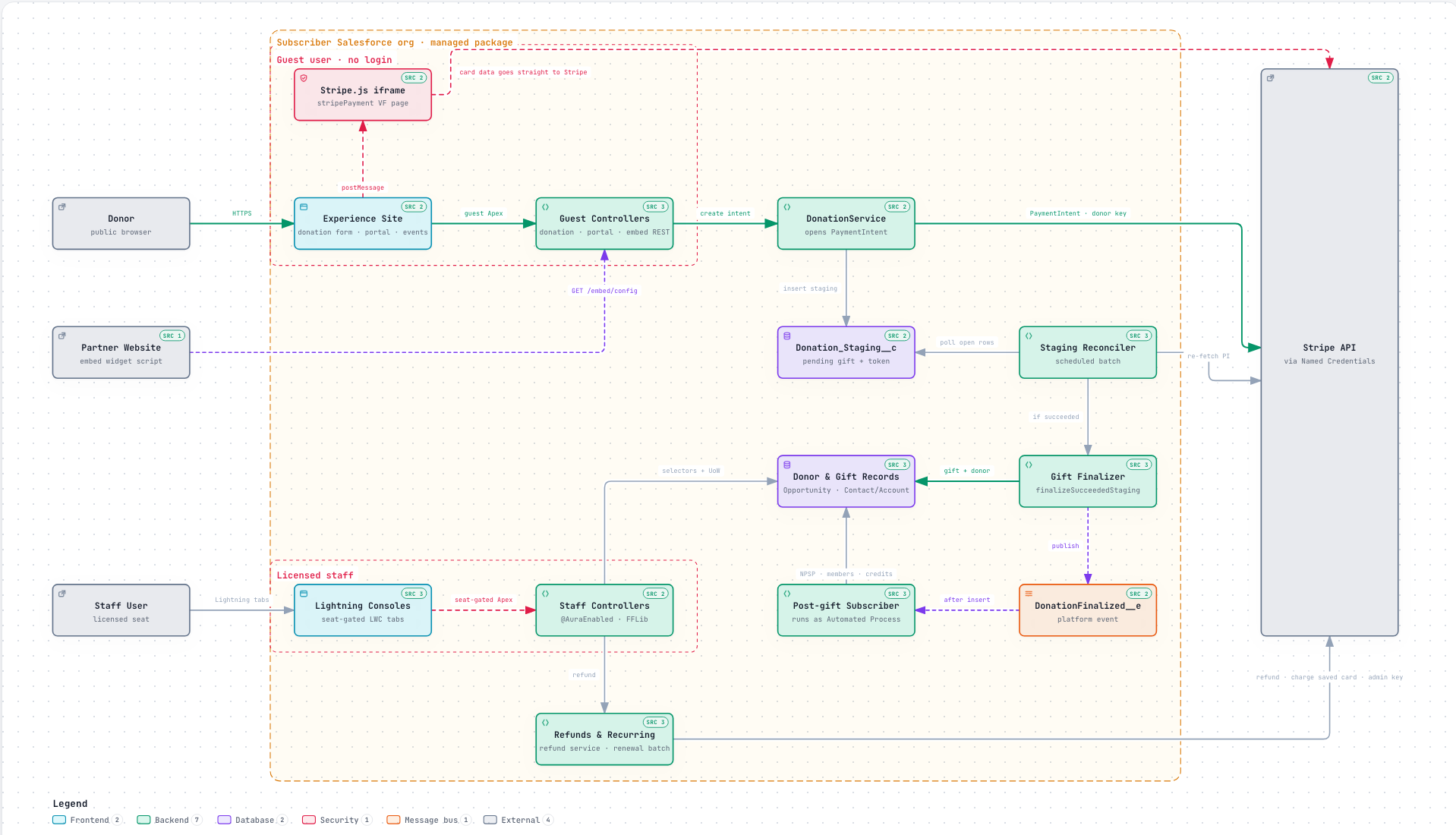
Figure 2. Component map. Everything inside the outer boundary is installed by the managed package into the subscriber's org; nothing of the package runs anywhere else. The Guest user boundary holds the only components an unauthenticated visitor can reach — the Experience site components, the Stripe.js iframe and the guest controllers, which write to Donation_Staging__c and nothing else directly. The Licensed staff boundary holds the Lightning consoles, their controllers and the refund / recurring-gift administration, every one gated by a permission set and, for the consoles, the seat check described in §3.1. The reconciler and the gift finalizer are the two server-side paths that turn a staged gift into donor and gift records; both converge on the same service, and both run without any inbound call from Stripe. Generated from the submission commit's source with per-node file references; the interactive original is in the repository.
2. Information flow — one donation, end to end#
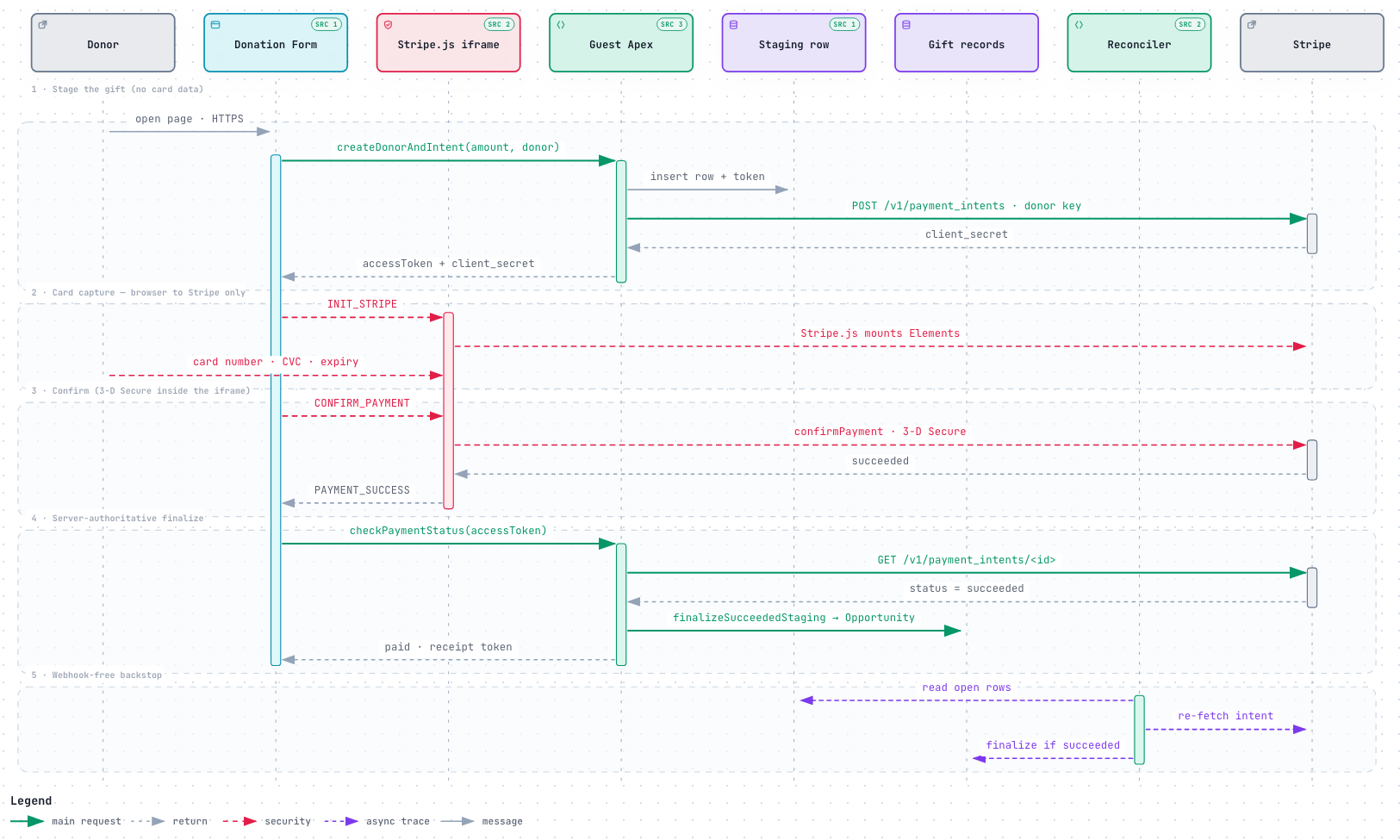
Figure 3. One guest donation. Red dashed messages carry or confirm cardholder data and run only between the browser-hosted Stripe.js iframe and Stripe. Solid green messages are the package's own server-side calls. The browser's PAYMENT_SUCCESS is never trusted: it only triggers checkPaymentStatus, in which Apex re-fetches the PaymentIntent from Stripe and finalizes the gift itself (segment 4). Segment 5 is the scheduled reconciler that finishes any gift whose browser closed early — the reason the package needs no webhook. The numbered steps below walk the same path in prose.
- Page load. An unauthenticated visitor requests a campaign page from the subscriber's Experience Cloud site over HTTPS. The page is composed of packaged Lightning Web Components running in the Guest User context.
- Intent creation. The component calls a packaged
@AuraEnabledcontroller. Apex creates aDonation_Staging__crecord holding the pending gift, then issues a server-side callout toPOST /v1/payment_intentsthrough a Named Credential. The publishable key and the intent'sclient_secretare returned to the browser. - Card capture. Stripe.js, loaded inside the
stripePaymentVisualforce iframe fromjs.stripe.com, renders Stripe Elements. The visitor's card number, CVC and expiry are captured by Stripe's own iframe and transmitted directly from the browser to Stripe. They never reach Salesforce, in any form, at any point. The iframe communicates with the parent component bypostMessagewith an explicit origin check on both sides. - Confirmation. The browser confirms the PaymentIntent directly with Stripe, including any 3-D Secure step, which is served from
hooks.stripe.com. On the save-card path only, apaymentMethod.id— an opaque token, not card data — is returned to Apex. - Outcome. Apex re-fetches the PaymentIntent from Stripe's API and reads its status. The package accepts no inbound webhook, so there is no externally callable endpoint to authenticate and no webhook signing secret to store. A scheduled reconciliation job re-fetches any intent left in flight.
- Persistence. On success the gift is written through the Unit of Work as an
Opportunitywith its related records. The donor is resolved byDonorResolutionService, which supports standard Contact/Account orgs and Person Account orgs without branching in callers. ADonationFinalized__eplatform event decouples the optional NPSP allocation sync; it is published and consumed inside the same package. - Receipt. A receipt is available on a public Experience Cloud page addressed by a capability token stored in
Receipt_Token__c.
3. Authentication and authorization#
3.1 To the Salesforce org
Staff users authenticate through Salesforce itself. The package performs no authentication of its own, ships no connected app, and carries out no OAuth flow. Three permission sets — Fundraising_Admin, Fundraising_User, Fundraising_ReadOnly — grant access to packaged objects, fields and Apex classes. Three custom permissions (Process_Refunds, Manage_Recurring_Gifts, Manage_Fundraising_Settings) gate the sensitive staff actions independently of record access.
Donors are never authenticated to Salesforce. Public pages run as the site's Guest User, holding a dedicated least-privilege permission set (Fundraising_GuestDonor). Guest access to standard objects is a documented manual step the administrator performs, because a 2GP permission set cannot ship a grant on a standard object; the package verifies that grant at runtime and reports it in the setup console.
Capability tokens. Two package-generated tokens address specific records over guest routes: Receipt_Token__c (a permanent, read-only receipt, deliberately without expiry) and Donation_Staging__c.Access_Token__c (an in-flight checkout, short-lived). Entropy, expiry, single-use-ness, revocation path and guest-FLS posture are documented for both in the accompanying false-positive document. A third credential, the donor-portal sign-in code, is emailed to a donor and redeemed for a short browser session; Portal_Access_Token__c stores only SHA-256 hashes of the code and the session, never the raw value, and is written exclusively by the portal service.
Seat licensing. Internal console tabs check UserInfo.isCurrentUserLicensed(namespace) through LicenseService and render a notice instead of their body to a user with no seat. The check fails open on any platform error and is never consulted on a guest or donor surface.
3.2 To Stripe
All Stripe API keys live only inside Named Credentials that the subscriber's administrator creates by hand in Setup. The package ships no Named Credential metadata and never stores, transmits or logs a key value. The Authorization header is injected by the platform at callout time and never appears in packaged source.
The subscriber creates two Stripe restricted keys with audited minimal scopes. The donor key, reachable on the public path, holds write on Payment Intents, Setup Intents, Customers and Payment Methods, and None on Charges, Refunds and Balance — so the credential exposed to the guest path structurally cannot issue a refund. The administrator key adds write on Payment Intents, Charges and Refunds, and read on Balance, Disputes, Customers and Payment Methods. Two runtime probes in the setup console verify the administrator actually built the keys to those scopes, rather than trusting the instruction.
Payment_Account__c.Stripe_Donor_Restricted_Key__c is a Text(80) field that holds a Named Credential API name, never a key. It is consumed as 'callout:' + value, and its field description states this verbatim.
4. Encryption on data transfer#
| Leg | Protocol | Notes |
|---|---|---|
| Donor browser → Experience Cloud site | HTTPS (TLS) | Terminated by Salesforce on the subscriber's own domain. |
| Donor browser → Stripe | HTTPS (TLS) | Card data. Direct to Stripe; Salesforce is not in this path. |
| Apex → Stripe API | HTTPS (TLS) | Server-side callout through a Named Credential. 30-second timeout. The only setEndpoint in the package. |
Third-party site → EmbedConfigResource | HTTPS (TLS) | Subscriber's own Salesforce Site. Read-only, origin-allowlisted. |
| Staff browser → publisher checkout (link only) | HTTPS (TLS) | A hyperlink opened in a new tab, not a callout; see §6. Carries the subscriber's 15-character Org Id as a query parameter and nothing else. |
No http:// endpoint is called anywhere in the package. All five packaged CSP trusted sites are https:// Stripe hosts and every one graded A+ on the Qualys SSL Server Test on 5 September 2026; the saved reports accompany this submission. Data at rest is held in Salesforce records and inherits the platform's encryption; the package stores no data anywhere else.
5. Data touchpoints#
| Data | Where it lives | Who can read it |
|---|---|---|
| Card number, CVC, expiry | Nowhere in Salesforce. Captured by Stripe.js in a Stripe-served iframe and transmitted browser → Stripe. | Stripe only. |
| Donor name, email, postal address | Contact / person Account in the subscriber's org. | Staff with the packaged permission sets. The Guest User cannot read donor records. |
| Gift amount, currency, designation, campaign | Opportunity and related packaged objects. | As above. |
| Payment method summary (brand, last four digits, expiry month/year) | Payment_Method__c. Stripe's own non-sensitive card metadata; no PAN. | As above. |
| Stripe customer and payment-method identifiers | Opaque Stripe identifiers on packaged records. | As above. |
| Donor-portal sign-in code and session | Portal_Access_Token__c — SHA-256 hashes only, short TTL, revocable by staff. | Written by the portal service; staff can revoke or purge, never read a usable value. |
| Callout and error diagnostics | Log__c and Transaction_Log__c in the subscriber's org. | Staff. Never returned to a guest; guest-facing errors are collapsed to one generic line. |
| Data sent to Stripe | Subscriber's own Stripe account: amount, currency, donor name and email (on Customer create — recurring and saved-card gifts only), and PaymentIntent recovery metadata (correlation id, campaign id, donor email) used to reconcile an interrupted payment. | The subscriber, in their Stripe dashboard. The publisher has no access. |
| Data sent to the publisher | None by the package. It emits no telemetry, no usage analytics and no phone-home traffic. The one publisher-hosted page it links to (§6) receives the Org Id in the URL only when a staff user chooses to click through. | — |
6. Externally reachable surface, and the one external link#
We list this explicitly rather than leave it to be discovered. The package exposes exactly one API endpoint and it is inbound-read-only:
EmbedConfigResource — the only global class in the package (1 of 293). A GET-only Apex REST resource, served by the subscriber's own Salesforce Site, that returns campaign display configuration (title, goal, suggested amounts, theme tokens) to the embeddable donation widget running on a third-party website. It returns no personal data and no donor records; it answers only origins on the subscriber's own allowlist in Settings__c; and it sanitizes its own error text by hand rather than relying on the shared controller wrapper. Sample requests and responses are in the accompanying Sample API Callouts document.
Guest-reachable pages on the Experience Cloud site (campaign, donation form, event registration, donor portal, receipt) are the other externally reachable surface. Every guest-reachable controller extends GuestAction, which collapses any non-package exception to a single generic message and writes the detail to Log__c; stack traces never enter a response.
Publisher-hosted link (not a callout). Staff consoles show a trial countdown and, to a user without a seat, a licence notice. Both carry a "Complete checkout" / "Manage subscription" link to the publisher's billing site, https://billing.cloudalgo.com/?app=pledgivo&org=<Org Id>, held in a protected packaged custom label (Subscription_Portal_Url) so it can only change by package upgrade. The link opens in a new tab; the package makes no HTTP request to that host, registers no CSP trusted site for it, and sends nothing but the Org Id, which appears on every Setup page and is not a secret. The setup console also links to the product documentation at https://pledgivo.cloudalgo.com. Neither host is in the donation data path and neither is reachable from a guest surface.
7. Basic usage instructions#
These are the steps a reviewer can follow in the supplied test org to walk the complete path.
Install and configure
- Install the managed package. A post-install handler seeds record types, page designs and default settings.
- Assign the Fundraising Admin permission set to the administrator.
- Open the Pledgivo app → Settings tab. The Get Started panel runs a step-by-step checklist that verifies each post-install step against the org live rather than asking the user to tick it off.
- Create and publish an Experience Cloud site, then grant the site's Guest User read access to
Campaignin Setup. This is the manual step a managed package cannot perform; the checklist detects and reports it. - Create the two Stripe restricted keys, store each in a Named Credential, and record the credential names on the Payment Account record. Press Test connection; the scope probes confirm the keys were built correctly.
Walk the data
- Create a Campaign, set a goal, choose a page design, and publish it to the site.
- Open the public campaign URL in a private browsing window — this is the Guest User path.
- Give a test donation using a Stripe test card. Observe that the card fields are a Stripe-served iframe.
- In the org, open the Donation Monitor tab: the gift is present as an Opportunity immediately, with no sync job and no waiting.
- Open the receipt URL from the donation record — a guest-reachable page addressed by its capability token.
- From the Opportunity, run the Refund Donation action (requires the
Process_Refundscustom permission). It uses the administrator credential; the donor credential cannot perform it. - Open the Diagnostic Logs tab to see every callout and job with its context.
8. Accompanying documents#
- Sample API Callouts — every outbound Stripe request and the one inbound endpoint, with complete header values, request bodies and sample responses.
- Checkmarx and Code Analyzer false-positive documents — one response per finding, each with the scanner's claim, why it is a false positive, and the Salesforce documentation it relies on.
- AppExchange Security Review Readiness — a per-category audit against Salesforce's Top 20 Vulnerabilities, with file-and-line evidence and re-runnable verification commands.
- CSS positioning analysis — every positioned CSS declaration in the package with its justification.
- Qualys SSL reports — for all five packaged external hosts.
- Product and administrator documentation — published at
https://pledgivo.cloudalgo.com.